
SaveTax Korean Tax Refund Fee Controversy — 5 Checkpoints Before Filing
SaveTax Korean Tax Refund Fee Controversy — 5 Checkpoints Before Filing
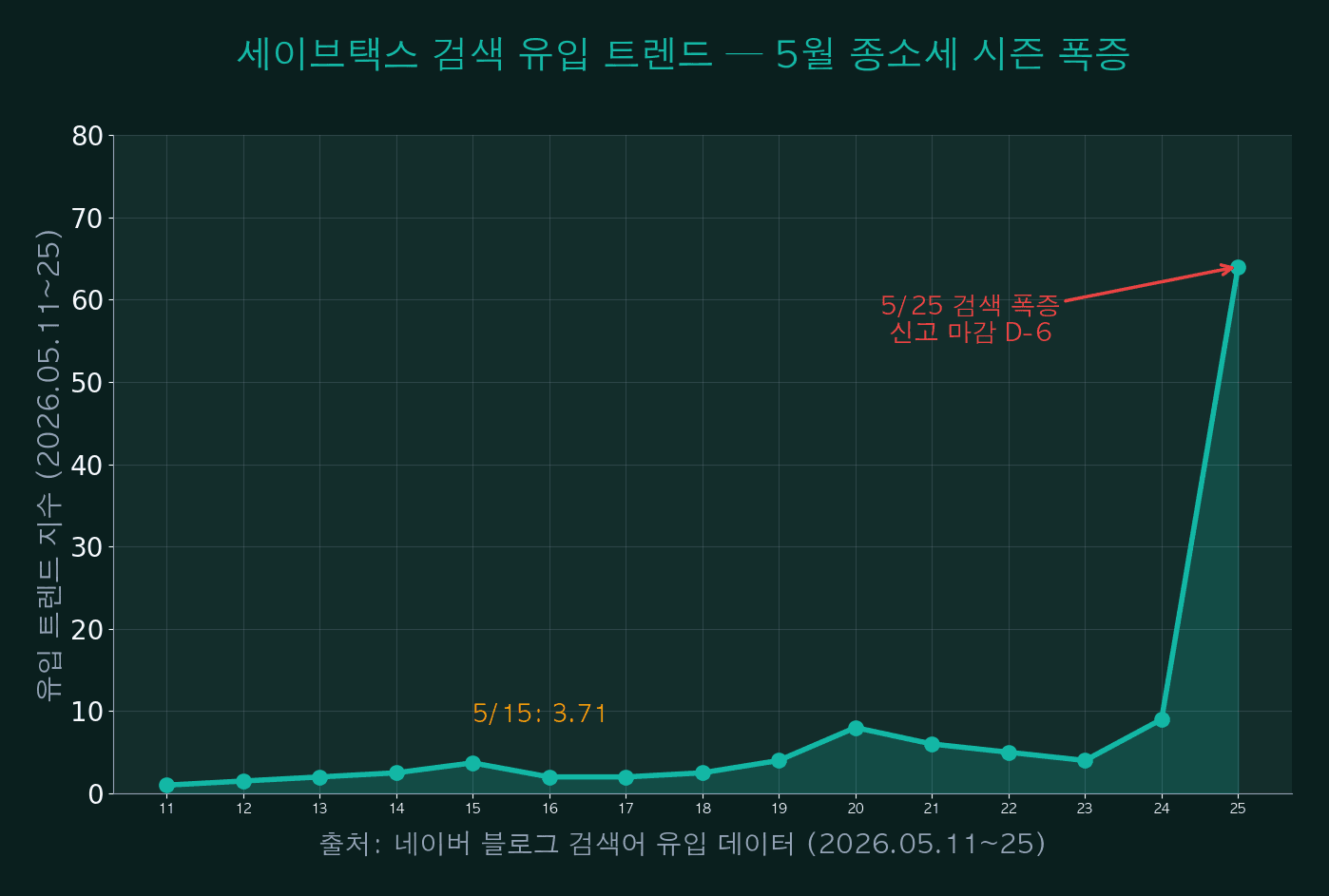
On May 25, 2026, Naver blog search inflow for ‘SaveTax’ (세이브택스), a Korean comprehensive income tax refund service, surged nearly 17× in one week as the May 31 filing deadline approached. However, the top search results were dominated by cautionary user reports — most notably a viral case where an estimated 4.22 million KRW refund turned into a 500,000 KRW additional payment after actual settlement.
This article summarizes the SaveTax refund service: its 5-step structure, fee breakdown, the gap between estimated and actual refund amounts, cancellation procedures, comparison with rival Samjeomsam (3.3), smishing detection, and 5 essential checkpoints before filing. The piece is informational only — not an endorsement or accusation. Refer to Korea NTS Hometax for official filing.
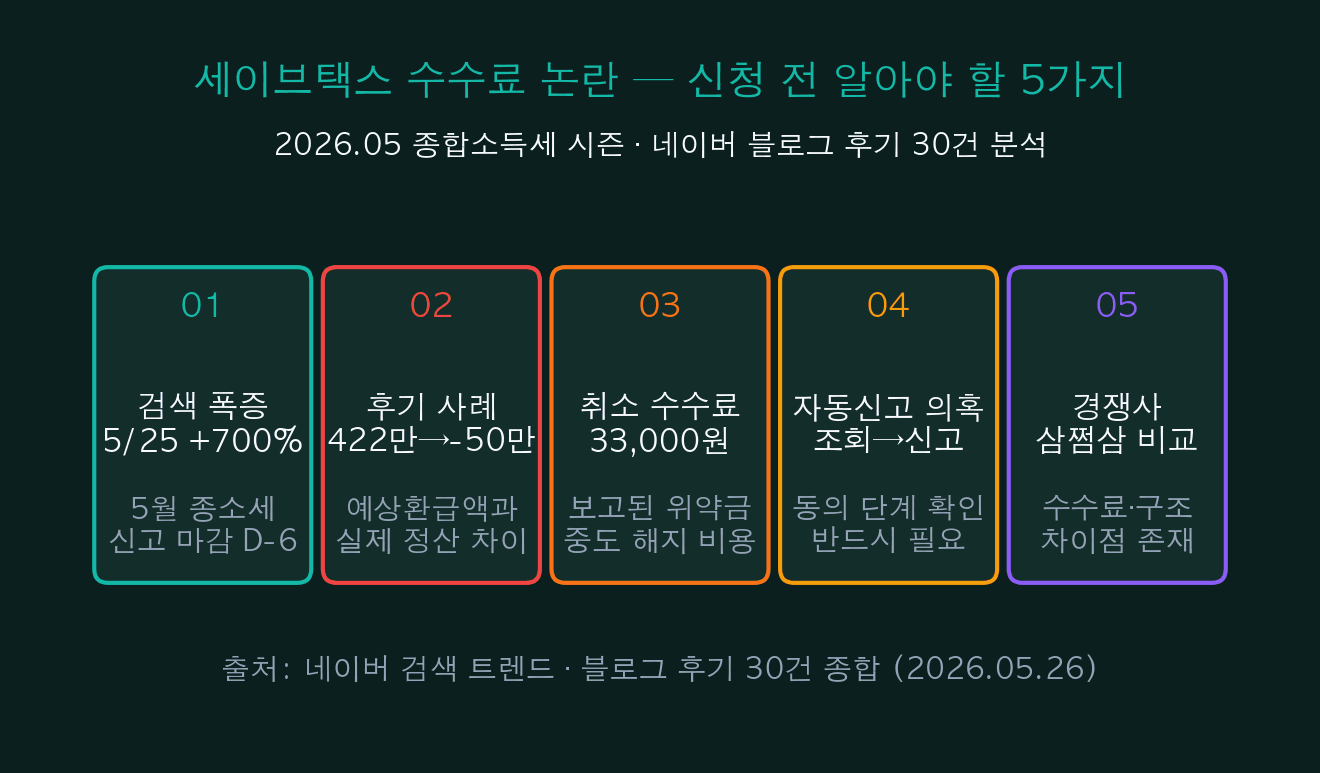
| Item | Key Indicator | Note |
|---|---|---|
| Search surge | 5/25: +17× | Korea income tax filing deadline D-6 |
| Reported case | 4.22M → -0.5M KRW | Estimate vs actual settlement (individual case) |
| Cancellation fee | 33,000 KRW (reported) | Mid-contract termination |
| Auto-filing concern | Inquiry → consent → filing flow | Consent step must be checked carefully |
| Rival service | Samjeomsam (3.3) — launched 2020 | Fee/structure differs slightly |
| Alternative | Hometax direct (free) | Zero fee for simple filing |
01SaveTax Korean Tax Refund — Why the May Search Surge?
Between May 11–25, Naver blog search inflow for SaveTax Korean tax refund grew approximately 17×. This pattern reflects Korea’s annual May 1–31 comprehensive income tax filing season, with peak demand in the final week before the May 31 deadline.
What stands out this year is the dominance of cautionary content in top search results: 11 of the top 20 blog posts focused on refund cancellation, fee disputes, and warning stories, while only 5 were neutral informational guides and 3 were comparison reviews.
| Category | Topic distribution | Share |
|---|---|---|
| Cautionary | Cancellation, fees, dismissal | 55% |
| Informational | Filing methods, refund lookup | 25% |
| Comparison | Samjeomsam vs SaveTax | 15% |
| Official | SaveTax own posts | 10% |
| Keyword pollution | Unrelated content (gold, KDP, diamonds) | 5% |
iINFO — Recurring annual pattern
Korea’s comprehensive income tax filing runs every May 1–31. Search volume always surges D-7 to deadline, with the heaviest 3 days right before May 31. This is structural seasonality of tax refund services, not necessarily an indicator of service quality issues.
02SaveTax Korean Tax Refund Service — How It Works
SaveTax is a Korean tax refund agency operated by Tax Accounting Firm SaveTax. It is an AI-based mobile/web service that estimates potential refunds for the past 5 years after KYC and information consent. Inquiry is free; commission is deducted from the actual refund after successful filing.
The flow is: KakaoTalk notification → identity verification + data consent → free refund inquiry → tax-agent delegation consent (STEP 4) → settlement with fee deduction. STEP 4 is the actual billing point — clicking ‘agree to delegate’ triggers the tax-agent commission. Many user complaints stem from not recognizing this step clearly.

| Step | Action | Cost | Note |
|---|---|---|---|
| STEP 1: Notify | KakaoTalk refund notification | — | Verify official channel |
| STEP 2: Verify | Identity + data consent | ID, account info provided | Confirm official channel |
| STEP 3: Inquiry | Refund estimate (last 5 years) | Free | No cost up to this point |
| STEP 4: Delegate | Tax-agent delegation consent | Commission trigger | Read carefully |
| STEP 5: Settle | Refund deposit → fee deduction | % of refund amount | Check terms |
03SaveTax Fee Structure — From Free Inquiry to Deduction
Users are most confused about the fee structure. The ‘free inquiry’ label leads many to assume the whole service is free, but the actual cost emerges later — when the agent files on their behalf and deducts a percentage. The structure can be broken into 6 stages: inquiry, application, success fee, cancellation fee, withdrawal cost, and worst-case (additional payment).
Notably, the cancellation fee of 33,000 KRW appeared in multiple user reviews after STEP 4 consent. The ‘worst-case’ scenario — where actual settlement differs from the estimate — can result in additional tax payment instead of a refund. This is not a system flaw but a fundamental limit: the estimate is calculated from user-supplied data only.

| Stage | Action | Cost | Note |
|---|---|---|---|
| 1. Inquiry | Refund estimate | Free | ID/data consent required |
| 2. Application | Tax filing delegation | Deferred deduction | Triggered at success |
| 3. Success fee | % of refund | Variable per terms | Check service terms |
| 4. Cancellation | Mid-contract termination | ~33,000 KRW reported | Confirm with terms |
| 5. Withdrawal | Tax-agent dismissal | Separate process | Possible directly via Hometax |
| 6. Worst case | Estimate-actual mismatch | Additional payment possible | Estimate is not guaranteed |
!WARNING — What ‘free inquiry’ really means
‘Free inquiry’ is accurate, but the next stage — STEP 4 ‘application/delegation consent’ — triggers commission. The page displaying ‘tax-agent delegation’ is the real billing point. Don’t assume that just clicking ‘inquire’ means no cost.
04Reported Case — 4.22M Refund Estimate Became 0.5M Additional Payment
The viral post on MoneyBrain’s Naver blog (May 25) titled “I saw a 4.22 million won refund and ended up paying 500,000 won extra” became the most-shared cautionary review of this tax season. Estimated refund: +4.22M KRW. Actual settlement: -0.5M KRW (additional tax due). Gap: approximately 4.72M KRW.
Such gaps occur because ‘estimated refund’ is calculated only from user-disclosed information (income, deductions, dependents). Once the actual filing reflects all income (side hustles, interest, dividends), adjusted deductions, and consistency with prior filings, the result can change drastically. Workers with undeclared freelance/N-job income are especially vulnerable to the ‘refund-to-payment flip’ scenario.
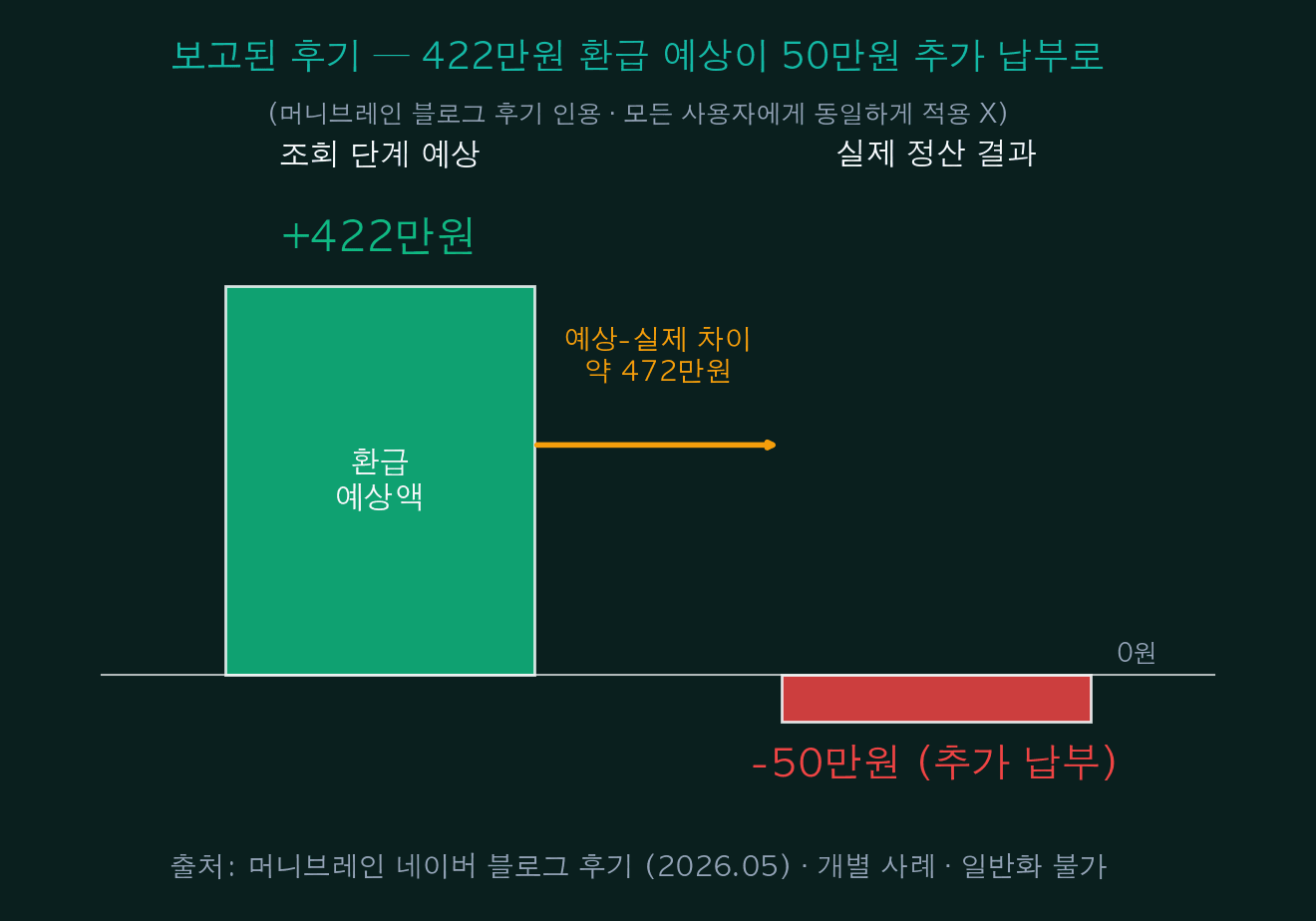
| Item | Inquiry estimate | Actual settlement | Gap |
|---|---|---|---|
| Refund estimate | +4.22M KRW | — | — |
| Actual outcome | — | -0.5M KRW | — |
| Gap (estimate-actual) | — | — | ~4.72M KRW |
| Reason 1 | Side income unreflected | Reflected → tax rate up | — |
| Reason 2 | Deductions overestimated | Only verifiable deductions | — |
| Reason 3 | Prior-year inconsistency | Prior filing correction needed | — |
!ALERT — ‘Estimated refund’ is just an estimate
The refund estimate shown at the inquiry stage is calculated only from user-supplied data. Actual filing reflects all income, deductions, and prior-year consistency, which can yield a very different result. Freelancers, N-jobbers, and rental-income earners must consider the possibility of additional tax payment.
05Cancellation/Withdrawal — 3-Step Fee Minimization
As more users seek to cancel after STEP 4 consent, ‘SaveTax cancellation method’ trended in May search results. The cancellation process has 3 steps: customer-service cancellation request → Hometax tax-agent dismissal → personal-info consent withdrawal. Cost depends on timing: before filing → STEP 2 dismissal alone is usually free; after filing → all 3 steps + reported 33,000 KRW fee.
The cleanest path is the National Tax Service Hometax (hometax.go.kr): MyHometax → Application/Submission → Delegation Management → directly dismiss the tax agent. Then withdraw from SaveTax via My Page to complete the process.
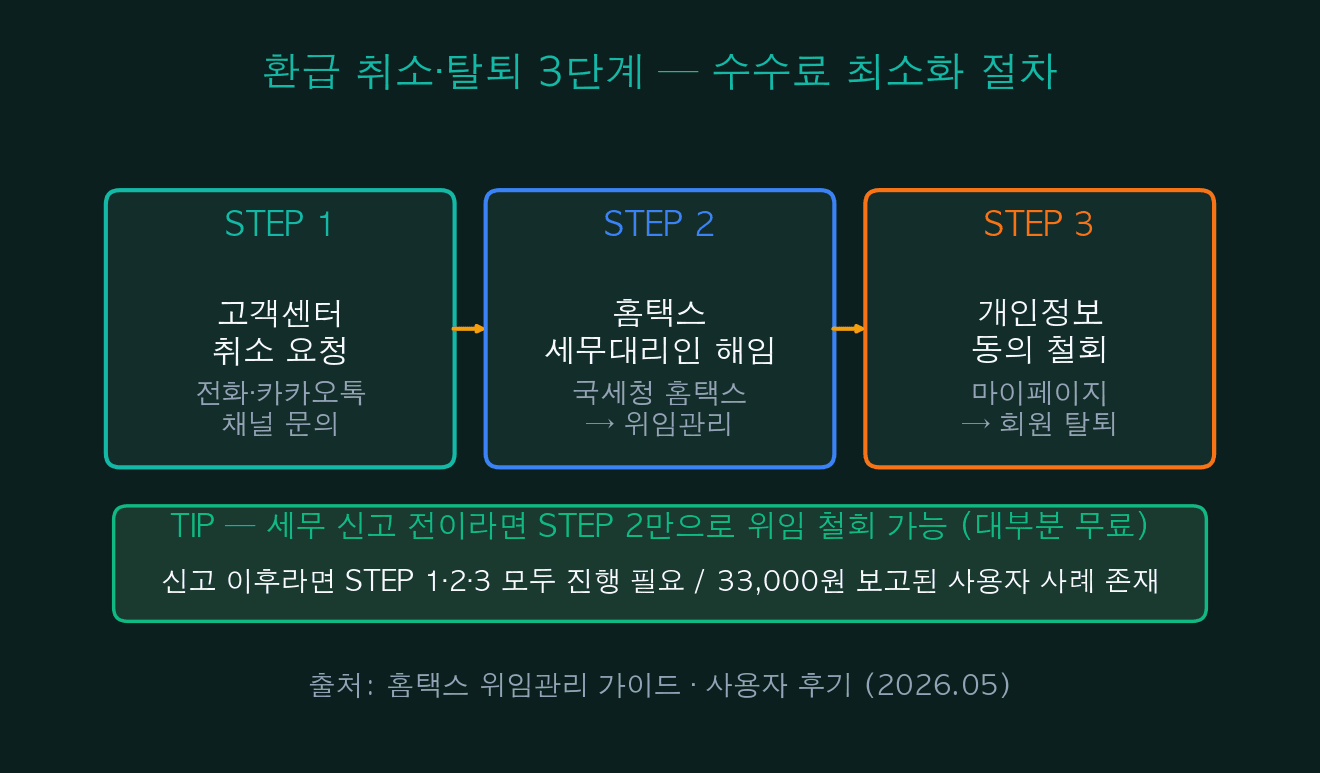
| Step | Action | Path | Expected cost |
|---|---|---|---|
| STEP 1 | Customer service cancellation | Phone, KakaoTalk channel | — |
| STEP 2 | Tax-agent dismissal | Hometax → MyHometax → Delegation Mgmt | Free |
| STEP 3 | Personal-info consent withdrawal | My Page → withdrawal / info deletion | — |
| Pre-filing | STEP 2 only | — | Usually free |
| Post-filing | All 3 steps | — | ~33,000 KRW reported |
| Recommended | Customer service → Hometax | Keep call records | — |
vTIP — Hometax direct dismissal is cleanest
Before filing is initiated, directly dismissing the tax-agent via Hometax is the fastest and lowest-cost option. Then withdraw from SaveTax to complete the process.
06Samjeomsam vs SaveTax Korean Tax Refund — Key Differences
SaveTax’s main rival is Samjeomsam (3.3), launched in 2020 — three years before SaveTax. Both offer Korean tax refund delegation, but they differ in target audience, fee structure, cancellation cost, and main issues. Samjeomsam initially focused on freelancers/N-jobbers with 10–20% fee tier; SaveTax (2023) expanded to office workers with terms-defined fees.
The biggest difference lies in ‘duplicate filing’ vs ‘auto-filing’ concerns. Samjeomsam has reports of duplicate filing when users had already filed directly. SaveTax has reports of ‘auto-filing after only doing inquiry’. Both stem from missed delegation consent at STEP 4.
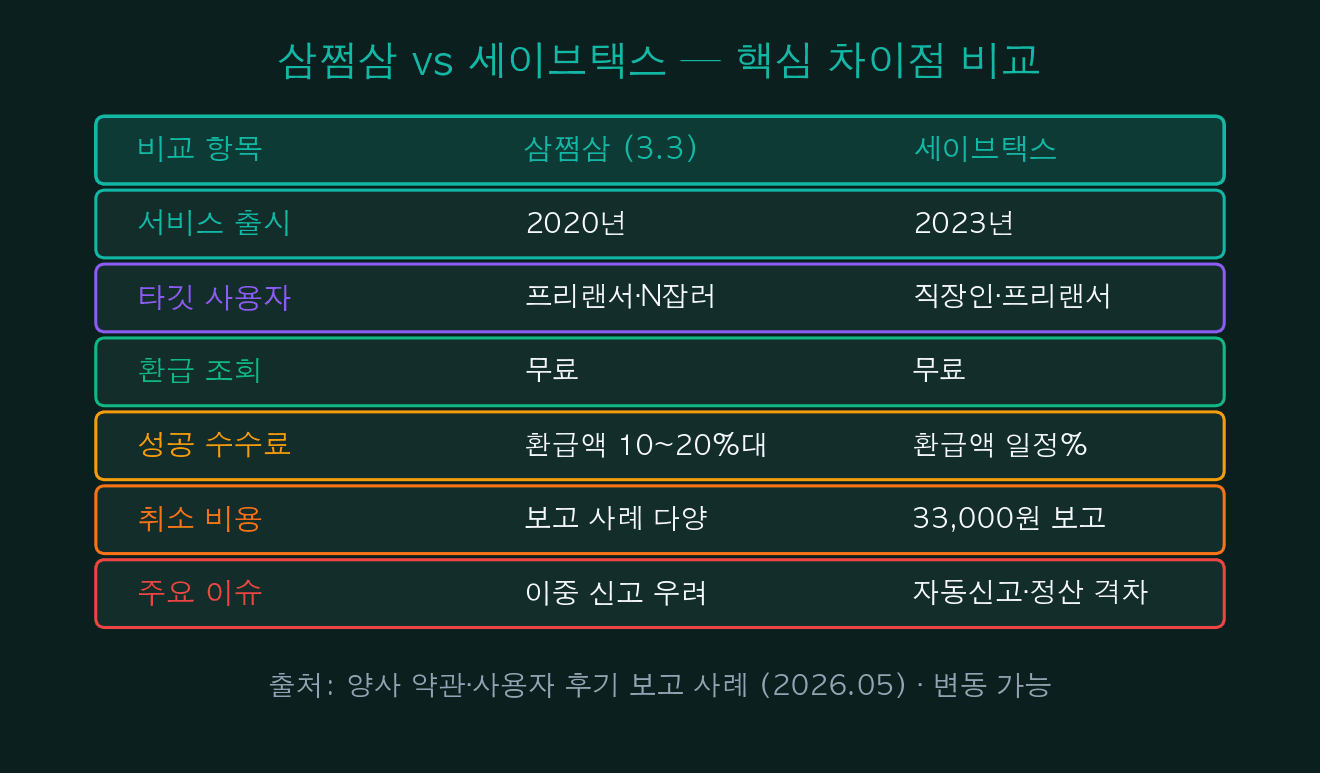
| Comparison | Samjeomsam (3.3) | SaveTax | Note |
|---|---|---|---|
| Launched | 2020 | 2023 | Samjeomsam 3 years earlier |
| Main target | Freelancer/N-job | Office workers + freelancers | SaveTax expanded scope |
| Inquiry | Free | Free | Same |
| Success fee | 10–20% of refund | % per terms | Varies |
| Cancellation | Varies (reports) | ~33,000 KRW | Check terms |
| Main issue | Duplicate filing concern | Auto-filing/settlement gap | Both: consent step matters |
| Official alt | Hometax direct | Hometax direct | Zero fee |
07Kakao Refund Notification — Genuine vs Smishing
May tax season also brings a surge of refund-disguised smishing/phishing attempts. Real notifications and smishing can look similar but differ across 5 points: sender channel, URL format, requested info, send timing, app install method.
Real notifications come from official Kakao channels (verified badge) with Naver/Kakao domains, and only request consent step actions. Smishing sends shortened URLs via personal Kakao/SMS, requests national ID and bank info directly, and often pushes APK file installation. Never install APK files directly — verify via official sources only.

| Check point | Genuine notification | Suspicious smishing | Why it matters |
|---|---|---|---|
| Sender channel | Official (verified) | Personal Kakao/SMS | Verified mark hard to forge |
| URL format | Naver/Kakao official | Shortened/odd URL | Domain is first check |
| Requested info | Consent step only | Direct ID/bank input | Direct input is dangerous |
| Send timing | May tax season | Random/off-season | Off-season alerts = suspicious |
| App install | Official app store | APK direct install | APK install: always refuse |
| Response | Verify via official channel | Block & report | Korea: 118 (spam/phishing report) |
!ALERT — Never install APK files
Most refund-disguised smishing requires APK file installation outside official app stores. This can lead to permission hijacking, SMS interception, and financial info leakage. Use only official Play Store / App Store. Report suspicious cases to NTS 126, FSS 1332, Korean Police 118.
085 Checkpoints Before Filing SaveTax Korean Tax Refund
Sections 1–7 above can be summed up in 5 words: terms, consent, comparison, Hometax, smishing. These 5 checkpoints are not anti- or pro-SaveTax — they’re for users to compare costs and alternatives, then choose rationally.
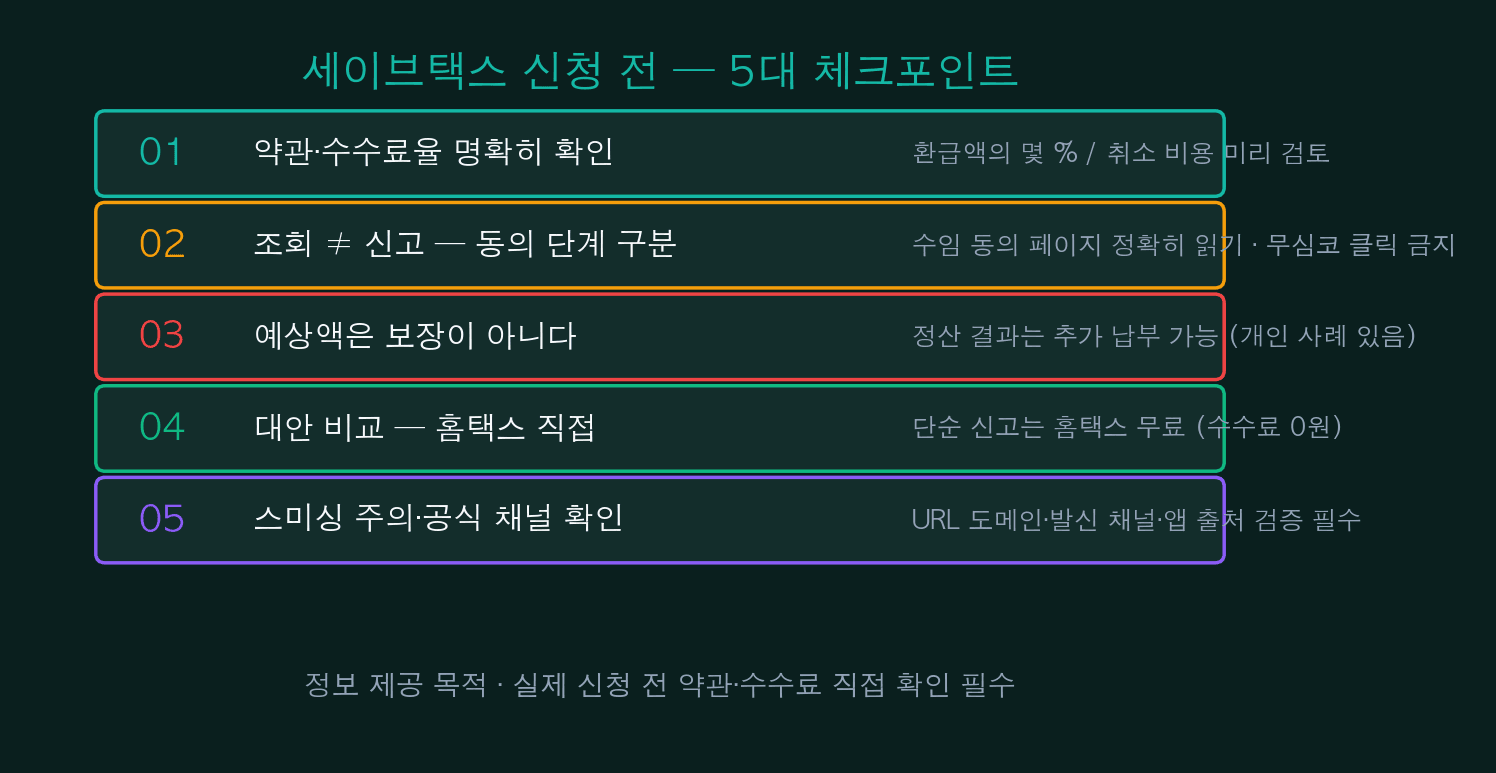
| Checkpoint | Key verification | Alternative / contact |
|---|---|---|
| 01. Terms & fees | Refund % / cancel cost (33K KRW reported) | Save terms-page screenshot |
| 02. Consent step | STEP 4 ‘tax-agent delegation’ | Avoid impulse clicks |
| 03. Estimate limits | Estimate vs additional payment risk | Check side income / N-job |
| 04. Alternative channel | Hometax direct (free) | hometax.go.kr |
| 05. Smishing prevention | Official channel/domain/app store | Report: 126 / 1332 / 118 |
- Korea’s annual May 1–31 tax filing season drives the refund-service search spike — be cautious nearing deadline
- SaveTax and Samjeomsam: STEP 4 delegation consent is the real commitment
- Refund estimate is just an estimate — consider possibility of additional payment
- Pre-filing cancellation via Hometax tax-agent dismissal is usually free
- Post-filing cancellation: reports of 33,000 KRW fee exist (verify terms)
- Simple Korean tax refund filing: Hometax direct, zero fee
- Smishing: APK install / direct ID input demands are decisive red flags
🔗 [This] SaveTax Korean Tax Refund Fee Controversy — 5 Checkpoints
🔗 [Related] May Korean Comprehensive Income Tax Guide — Hometax Direct Filing
🔗 [Related] Samjeomsam vs SaveTax — 4 Korean Tax Refund Agencies Compared
🔗 [Related] Kakao Refund Smishing — 5-Point Genuine vs Fake Check
🔗 [Next] Freelancer/N-job Korean Comprehensive Income Tax — Avoiding Additional Payment (June)
#SaveTax
#SaveTax refund
#SaveTax fee
#SaveTax cancellation
#SaveTax review
#Korea tax refund
#Korea income tax
#May tax season Korea
#Korean tax refund
#tax agent dismissal
#Samjeomsam comparison
#Samjeomsam
#cancellation fee
#refund estimate
#delegation consent
#Hometax direct filing
#Hometax refund
#NTS Hometax
#MyHometax
#tax filing agency
#refund smishing
#Kakao refund notification
#phishing alert
#smishing detection
#official channel
#freelancer Korean tax
#office worker Korean tax
#N-job comprehensive tax
#refund cancellation
#getdir real-time